ForTem API Documentation
Download OpenAPI specification:
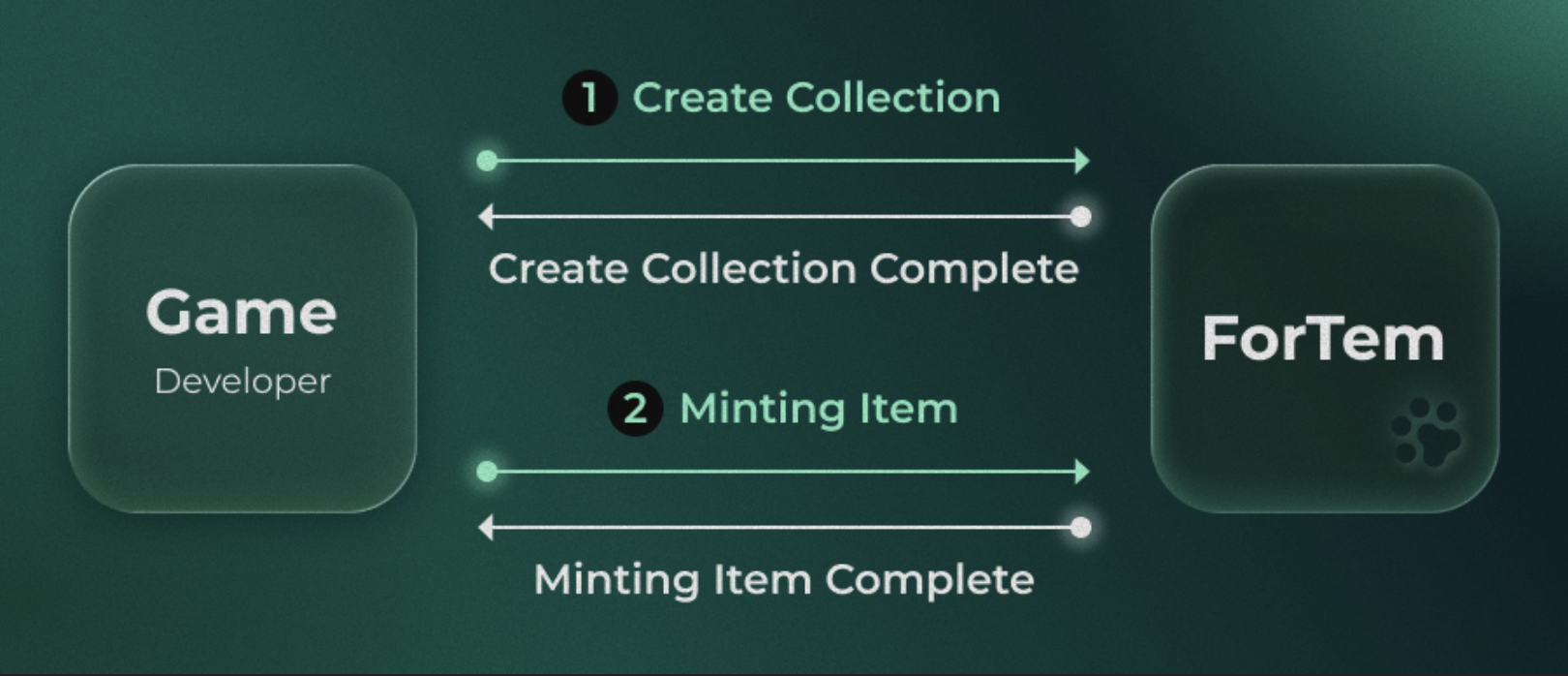
ForTem provides APIs designed to help game developers seamlessly integrate their games with Web3 technology.
By connecting through the ForTem API, your game can easily link on-chain assets and player data.
SDK (For Unity)
We provide an SDK for Unity, allowing seamless integration without the need to manually implement API calls. Using the SDK, you can access ForTem features more easily and efficiently within your game.
SDK (For JavaScript / TypeScript)
We provide an SDK for JavaScript/TypeScript, enabling seamless server-side integration without the need to manually implement API calls.
Installation
npm install @fortemlabs/sdk-js
# or
pnpm install @fortemlabs/sdk-js
# or
yarn add @fortemlabs/sdk-js
Prompt (For LLMs)
After downloading, game developers can use this guide as follows:
- Cursor: Copy the content into a
.cursorrulesfile at the project root or reference it directly. - Claude Code: Add the content to
CLAUDE.mdor place it within the.claude/folder. - ChatGPT / Gemini: Copy and paste the entire content into the System Prompt.
👉 Download
Environments
| Testnet | Mainnet | |
|---|---|---|
| API | https://testnet-api.fortem.gg |
https://api.fortem.gg |
| SERVICE | https://testnet.fortem.gg |
https://fortem.gg |
🚨 Call Limits (per day — Resets daily at 00:00 UTC)
| Type | Limit |
|---|---|
| Collection | 100 |
| Item | 1,000 |
This is a required authentication flow for using the User, Collection, and Item APIs.
You must first obtain a nonce, then request an access token via the auth/access-token endpoint.
The issued access token is valid for up to 5 minutes.
🚨 Important Notice: When minting a Collection or Item, the access token is single-use for that request and cannot be reused afterward.
Get Nonce
Generates a nonce required to obtain an access token.
Use your Developer API Key in the x-api-key header.
Authorizations:
Responses
Response samples
- 200
- 400
{- "statusCode": 200,
- "data": {
- "nonce": "f09d58d9a251627e2a60c215f0b845fdc5714f33b5e3ac609f9284da18a6c24f"
}
}Get Access Token
Exchanges a nonce for a short-lived access token (valid up to 5 minutes).
🚨 The access token is single-use when minting a Collection or Item — it cannot be reused after that request.
Authorizations:
Request Body schema: application/jsonrequired
| nonce required | string Nonce value obtained from the |
Responses
Request samples
- Payload
{- "nonce": "f09d58d9a251627e2a60c215f0b845fdc5714f33b5e3ac609f9284da18a6c24f"
}Response samples
- 200
- 400
{- "statusCode": 200,
- "data": {
- "accessToken": "eyJhbGciOiJIUzI1NiIsInR5cCI6IkpXVCJ9..."
}
}Provides APIs related to ForTem users.
In the current version, only a validation API is available — it allows you to verify whether a given wallet address belongs to a registered ForTem user.
Get User by Wallet Address
Retrieves ForTem user information based on a Sui wallet address.
- If the address does not belong to a ForTem user, the response will return
"isUser": false. - If it does, the response will return
"isUser": truealong with the user's basic profile information.
Authorizations:
path Parameters
| walletAddress required | string Example: 0x904bb53d5508de51fdf1d3c3960fd597e52cb39ae11c562ca22f1acbb2702d8b Sui wallet address of the user |
Responses
Response samples
- 200
- 400
{- "statusCode": 200,
- "data": {
- "isUser": true,
- "nickname": "6f0b8ffc0d11",
- "profileImage": "profile/default.png",
- "walletAddress": "0x904bb53d5508de51fdf1d3c3960fd597e52cb39ae11c562ca22f1acbb2702d8b"
}
}Create or retrieve collections that serve as game item groups. A game collection must be created before any items can be registered.
- Items are created under a specific collection, serving as part of its grouped structure.
- Each user can have up to five collections at the same time.
- The API provides endpoints for collection creation and collection listing.
List Collections
Retrieves the list of collections created by the authenticated developer.
Through this API, you can obtain each collection's unique identifier and related metadata information.
Authorizations:
Responses
Response samples
- 200
- 400
{- "statusCode": 200,
- "data": [
- {
- "id": 50,
- "objectId": "0x5809794eaab2324dfd04fc2ef572574fdff559b3d97e598f72652fa136ea314e",
- "name": "collection",
- "description": "collection description",
- "tradeVolume": "0",
- "itemCount": 0,
- "createdAt": 1761812950000,
- "updatedAt": 1761812958000
}
]
}Create Collection
Creates a new collection for the authenticated developer. This API registers a new collection that can later be used to group and manage items.
Each user can have up to five collections at the same time.
Authorizations:
Request Body schema: application/jsonrequired
| name required | string Name of the collection |
| description required | string Description of the collection |
object (CollectionLink) |
Responses
Request samples
- Payload
{- "name": "My Game Collection",
- "description": "Items for my awesome game",
}Response samples
- 200
- 400
{- "statusCode": 200,
- "data": {
- "id": 50,
- "objectId": "0x5809794eaab2324dfd04fc2ef572574fdff559b3d97e598f72652fa136ea314e",
- "name": "My Game Collection",
- "description": "Items for my awesome game",
- "tradeVolume": "0",
- "itemCount": 0,
- "createdAt": 1761812950000,
- "updatedAt": 1761812958000
}
}Create or retrieve items within an existing collection. Items are tied to collections and can include redeem codes, attributes, and images for full Web3 integration.
- A collection must be created beforehand.
- When creating an item, a Redeem code that integrates with your game is required.
- If you do not upload a custom image, the item will automatically display ForTem's default item image.
- Custom images are stored and managed on the IPFS server.
List Items
Retrieves a list of items belonging to a specific collection. Supports pagination, search, and sorting.
Authorizations:
path Parameters
| collectionId required | integer Example: 50 The ID of the collection to retrieve items from |
query Parameters
| skip | integer >= 0 Default: 0 Number of items to skip (for pagination). Min: 0 |
| take | integer <= 100 Default: 10 Number of items to return. Max: 100 |
| query | string Search keyword to filter items by name |
| sortBy | string Default: "TRADE_VOLUME" Enum: "TRADE_VOLUME" "RECENTLY_MINTED" Sort order |
Responses
Response samples
- 200
- 400
{- "statusCode": 200,
- "data": [
- {
- "id": 207,
- "objectId": "0x13701df0e90f5da4c8ab2e0d9a6624e01b8853d439789cf5d4f5537ec342d93e",
- "name": "Enchanted Blossom Edge 66",
- "description": "A legendary sword forged with sakura magic.",
- "nftNumber": 12,
- "quantity": 3,
- "attributes": [
- {
- "name": "Rarity",
- "value": "Epic"
}, - {
- "name": "Element",
- "value": "Fire"
}
], - "status": "KIOSK_LISTED",
- "createdAt": 1764753981000,
- "updatedAt": 1770274058000
}
], - "metadata": {
- "pagination": {
- "totalItems": 12
}
}
}Create Item
Creates a new item within the specified collection.
Note: The redeemCode value must be unique — duplicate codes are not allowed.
Authorizations:
path Parameters
| collectionId required | integer Example: 50 The ID of the collection to create the item in |
Request Body schema: application/jsonrequired
| name required | string Name of the item |
| quantity required | integer Quantity of the item |
| redeemCode required | string Developer-managed unique item code. Must be unique — duplicates are not allowed. |
| redeemUrl | string <uri> (Optional) URL for the developer's unique item code import site |
| description required | string Description of the item |
| itemImage | string (Optional) CID value returned from the image-upload endpoint. If omitted, the ForTem default image is used. |
Array of objects (ItemAttribute) (Optional) Custom attributes for the item | |
| recipientAddress | string (Optional) Recipient Sui wallet address. Must be a registered ForTem user. |
Responses
Request samples
- Payload
{- "name": "Enchanted Sword",
- "quantity": 3,
- "redeemCode": "1234-5678-ABCD-EFGH",
- "description": "A powerful enchanted sword",
- "itemImage": "bafkreigh2akiscaildc...",
- "attributes": [
- {
- "name": "Attack Power",
- "value": "120"
}
], - "recipientAddress": "0x904bb53d5508de51fdf1d3c3960fd597e52cb39ae11c562ca22f1acbb2702d8b"
}Response samples
- 200
- 400
{- "statusCode": 200,
- "data": {
- "itemId": 40,
- "name": "Enchanted Sword",
- "description": "A powerful enchanted sword",
- "collectionId": 50,
- "nftNumber": 8,
- "quantity": 3,
- "redeemCode": "1234-5678-ABCD-EFGH",
- "redeemUrl": null,
- "attributes": [
- {
- "name": "Attack Power",
- "value": "120"
}
], - "status": "PROCESSING"
}
}Get Item by Redeem Code
Retrieves item information using the specified redeemCode.
Item Status Values
| Status | Description |
|---|---|
PROCESSING |
The item is currently being processed as an NFT. No action required. |
MINTED |
The item has been successfully minted as an NFT. |
OFFER_PENDING |
The item is pending an exchange offer with another item. |
KIOSK_LISTED |
The item is listed for sale to other users. |
REDEEMED |
The NFT has been burned for in-game use (redemption completed). |
🚨 This is a read-only API for simple verification. Ensure that the duplicate usage check for redeem codes is implemented on your side.
🚨 Developers are strongly advised to verify whether an item's status is REDEEMED before proceeding with any related game logic or operations.
Authorizations:
path Parameters
| collectionId required | integer Example: 50 The ID of the collection |
| code required | string Example: 1234-5678-ABCD-EFGH Developer-managed unique item redeem code |
Responses
Response samples
- 200
- 400
{- "statusCode": 200,
- "data": {
- "id": 32,
- "objectId": "0xe337dea185565f75470e15d24efd0782854780d40e97d582e00a3c8f44e43afa",
- "name": "Enchanted Sword",
- "description": "A powerful enchanted sword",
- "nftNumber": 1,
- "quantity": 3,
- "attributes": [
- {
- "name": "Rarity",
- "value": "Epic"
}, - {
- "name": "Element",
- "value": "Fire"
}
], - "owner": {
- "nickname": "e2718cb752c3",
- "walletAddress": "0x6dc2f09e0354838d571e42fa23b8ca7162b28babb872a20eea9a662eb80397f3"
}, - "status": "REDEEMED",
- "createdAt": 1761809825000,
- "updatedAt": 1761809825000
}
}Update Item
Updates item details for a specific collection and redeem code.
While all fields are optional, at least one field must be provided in the request body to execute the update.
Authorizations:
path Parameters
| collectionId required | integer Example: 50 The ID of the collection |
| code required | string Example: 1234-5678-ABCD-EFGH Developer-managed unique item redeem code |
Request Body schema: application/jsonrequired
| name | string Updated name of the item |
| description | string Updated description |
| itemImage | string Updated image CID from image-upload endpoint |
Array of objects (ItemAttribute) Updated attributes (replaces all existing attributes) |
Responses
Request samples
- Payload
{- "name": "Enchanted Sword v2",
- "description": "Updated description",
- "itemImage": "bafkreigh2akiscaildc...",
- "attributes": [
- {
- "name": "Attack Power",
- "value": "150"
}
]
}Response samples
- 200
- 400
{- "statusCode": 200,
- "data": {
- "itemId": 195,
- "name": "Enchanted Sword v2",
- "description": "Updated description",
- "attributes": [
- {
- "name": "Attack Power",
- "value": "150"
}
]
}
}Update Item Attributes
Updates only the attributes of an item for a specific collection and redeem code.
Authorizations:
path Parameters
| collectionId required | integer Example: 50 The ID of the collection |
| code required | string Example: 1234-5678-ABCD-EFGH Developer-managed unique item redeem code |
Request Body schema: application/jsonrequired
required | Array of objects (ItemAttribute) New attributes to set (replaces all existing attributes) |
Responses
Request samples
- Payload
{- "attributes": [
- {
- "name": "Rarity",
- "value": "Epic"
}, - {
- "name": "Element",
- "value": "Water"
}
]
}Response samples
- 200
- 400
{- "statusCode": 200,
- "data": {
- "itemId": 195,
- "attributes": [
- {
- "name": "Rarity",
- "value": "Epic"
}, - {
- "name": "Element",
- "value": "Water"
}
]
}
}Upload Item Image
Uploads an image for use in item creation.
If you want to apply a custom image during item creation, call this API first, then include the returned CID value in the itemImage field of the item creation request.
- Allowed image size: up to 256×256px
- Maximum file size: 200KB
- Accepted formats:
JPG,PNG - All uploaded images are stored on IPFS
Note: This feature is optional and not required for item creation.
Authorizations:
path Parameters
| collectionId required | integer Example: 50 The ID of the collection |
Request Body schema: multipart/form-datarequired
| file required | string <binary> Image file to upload (JPG or PNG, max 256×256px, max 200KB) |
Responses
Response samples
- 200
- 400
{- "statusCode": 200,
- "data": {
- "itemImage": "QmNWugAX8iUXPSKnpxBMcDne7dQgDFms6Y7guumiApBLGv"
}
}